Huda Elshwadfy
Content Writer at Recruitera
Table of contents

    Quick answer: An ATS (Applicant Tracking System) manages your hiring process — from job posting to signed offer. An HRIS (Human Resources Information System) manages your employees after they're hired — payroll, records, leave, and compliance. They solve different problems, serve different teams, and are both worth investing in at the right stage of growth. This guide tells you exactly when that is.

    If you've ever Googled "what software do I need for HR," you've almost certainly ended up more confused than when you started. Two acronyms dominate every vendor comparison page, every HR job description, and every SaaS pricing table: ATS and HRIS. Vendors use them interchangeably. Job posts list both as requirements. Analysts lump them under "HR tech" as if they're the same category.

    They're not.

    An ATS and an HRIS solve fundamentally different problems, serve different users inside your organization, and become critical at different stages of your company's growth. Confusing them — or worse, buying the wrong one first — is one of the most common and costly HR technology mistakes growing businesses make.

    This guide covers everything: what each system actually does, the features that matter, where they overlap, how they integrate, and a practical framework to help MENA businesses decide which investment to make first, second, and when.

    What Is an ATS? A Complete Breakdown

    An Applicant Tracking System (ATS) is software built specifically to manage the recruitment process — from the moment a role is approved to the moment a candidate signs their offer letter.

    The name is slightly misleading. Modern ATS platforms don't just "track applicants" — they power the entire hiring operation. Think of an ATS as the operational layer that sits between your open roles and your new hires, coordinating every step in between.

    Core ATS Functions

    Job Requisition and Approval
    Before a job goes live, it needs to be approved. A good ATS has a built-in requisition workflow — the hiring manager submits a request, it routes to the relevant approver (finance, HR director, or CEO depending on your structure), and once approved, it triggers the next steps automatically. No email chains, no lost approvals.

    Multi-Channel Job Posting
    Writing and publishing a job ad to a dozen different platforms — Wuzzuf, Bayt, LinkedIn, your career page, internal job boards — manually is a full day's work. An ATS does it in one click. You write the job description once, select your channels, and it distributes. It also tracks which channel brought in which candidate.

    Career Page Management
    Your career page is often the first impression a candidate gets of your company. Most modern ATS platforms include a career page builder — branded, filterable by department or location, and automatically updated when jobs open or close. No developer required.

    Application Collection and CV Parsing
    Every application that comes in — from every channel — lands in one place. The ATS parses CVs automatically, extracts key information (experience, education, skills, contact details), and creates a structured candidate profile. No more downloading 200 CVs into a folder and manually opening each one.

    Pipeline Management
    Candidates move through stages — applied, screened, phone interview, technical assessment, final interview, offer, hired or rejected. The ATS gives every recruiter and hiring manager a real-time view of where every candidate stands in every role.

    Candidate Screening and Scoring
    Many ATS platforms let you set knockout questions, scoring rubrics, or AI-powered relevance scoring. This dramatically reduces the time spent on unqualified applications. Recruiters only review candidates who meet the baseline criteria.

    Collaboration and Feedback
    Hiring is a team sport. An ATS gives hiring managers a portal to review shortlisted candidates, leave structured feedback, and score profiles — without needing access to the full recruiter interface. Everyone's input is captured in one place.

    Interview Scheduling
    Coordinating interview slots across multiple interviewers and candidates is one of the most time-consuming parts of recruitment. An ATS automates this — candidates can self-schedule from available slots, calendar invites are sent automatically, and reminders go out 24 hours before.

    Communication Automation
    Every touchpoint in the candidate journey — application acknowledgment, screening invitation, rejection, offer — can be automated. Candidates get timely responses, your employer brand improves, and your recruiters aren't copying and pasting the same emails 50 times a week.

    Offer Management
    When a candidate reaches the offer stage, the ATS generates the offer letter from a template, routes it for internal approval, and sends it to the candidate for digital signature — all within the platform. Offer status is tracked in real time.

    Talent Pool and Pipeline Building
    Not every great candidate is right for the current role. An ATS lets you tag and save candidates for future opportunities, create talent pools by function or skill set, and reach back out when the right role opens.

    Recruitment Analytics
    Time-to-hire, time-to-fill, source quality, offer acceptance rate, pipeline conversion rate, cost-per-hire — all of these metrics live in your ATS. Leadership gets reporting dashboards. Recruiters get visibility into their own performance.

    Who Uses an ATS?

    The primary users of an ATS are recruiters and hiring managers. HR directors use it for reporting. In some organizations, finance and department heads interact with it for headcount planning and requisition approvals. The candidate is also a user — they interact with the application form, the career page, and any self-scheduling or communication flows the ATS powers.

    What Is an HRIS? A Complete Breakdown

    An Human Resources Information System (HRIS) — sometimes called an HRMS (Human Resources Management System) or HCM (Human Capital Management) platform — is software built to manage everything that happens after a person joins your organization.

    Where an ATS gets people through the door, an HRIS manages them once they're inside. It is the system of record for your workforce.

    Core HRIS Functions

    Employee Records Management
    The HRIS is where every employee's file lives — personal details, emergency contacts, employment history, role changes, salary history, performance reviews, disciplinary records, and documents. It replaces the physical filing cabinet and the patchwork of spreadsheets that most HR teams start with.

    Onboarding
    When a new hire's paperwork is done, the HRIS takes over. It triggers onboarding checklists, assigns tasks to IT, facilities, and the manager. Digital document signing, policy acknowledgment, and compliance training can all be managed from within the platform.

    Payroll Processing
    Payroll is the most mission-critical function an HRIS handles. It calculates gross salaries, applies deductions (social insurance, income tax, advances), processes overtime and allowances, and generates payslips. In Egypt and MENA, payroll is particularly complex — social insurance contributions, variable allowances, end-of-service calculations, and multi-currency setups all need to be handled correctly.

    Attendance and Leave Management
    The HRIS tracks when employees are in and out — through integration with access control systems, biometric clocks, or mobile apps. It manages leave balances, handles leave requests and approvals, calculates carryover rules, and flags attendance anomalies.

    Performance Management
    Annual and mid-year appraisal cycles, goal setting, 360-degree feedback, competency assessments, and calibration sessions — all of this lives in the performance module of a modern HRIS.

    Benefits Administration
    Health insurance enrollment, meal allowances, transportation, profit sharing, stock options — the HRIS tracks which employees are enrolled in which benefits, calculates the cost, and ensures deductions and contributions are accurate in payroll.

    Organizational Structure Management
    The HRIS holds your org chart — who reports to whom, which department each person belongs to, cost center allocations, and headcount by function. This data feeds into budget planning, succession planning, and workforce analytics.

    Compliance and Statutory Reporting
    In every market, HR has legal obligations — submitting social insurance forms, generating statutory reports, ensuring labor law compliance, maintaining records for audits. The HRIS automates the generation of these reports and maintains an audit trail that proves compliance.

    Offboarding
    When an employee leaves, the HRIS manages the offboarding process. Exit interviews, clearance checklists, final payroll settlement, end-of-service gratuity calculations, and documentation are all tracked through the platform.

    Who Uses an HRIS?

    The primary users of an HRIS are HR generalists, payroll specialists, and HR managers. Employees use it in self-service mode — to check their payslips, request leave, update personal information, or complete their performance reviews. Managers use it to approve requests, view their team, and conduct appraisals.

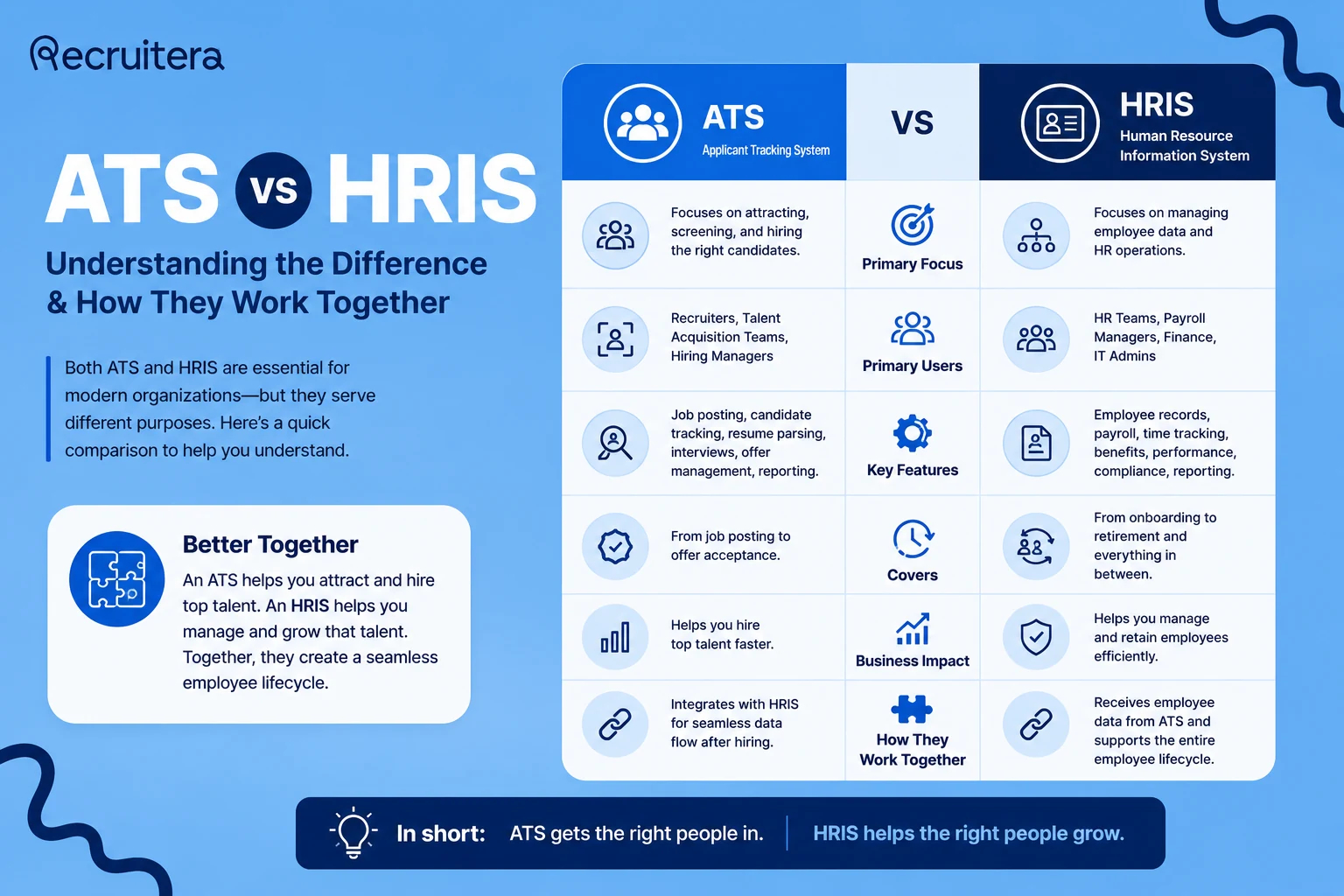
    ATS vs HRIS: The Complete Side-by-Side Comparison

    Here is how the two systems compare across every dimension that matters:

    Dimension ATS HRIS
    Primary purpose Hire the right people efficiently Manage and develop existing employees
    Core users Recruiters, hiring managers HR generalists, payroll team, managers
    Process starts when Job requisition is approved Offer letter is signed / employee joins
    Process ends when Candidate is hired or rejected Employee exits the organization
    Key outputs Shortlists, interview schedules, offer letters Payslips, contracts, appraisal records, compliance reports
    Compliance focus Candidate data privacy, equal opportunity Labor law, payroll tax, social insurance
    Speed impact Reduces time-to-hire Reduces payroll errors and admin time
    MENA relevance High-volume pipeline, Arabic career pages Localized payroll, Egyptian labor law compliance
    Typical first investment Earlier stage (high hiring volume) Later stage (larger workforce)

    Where ATS and HRIS Overlap — And Why It Matters

    Modern platforms are blurring the line between these two categories. Understanding the overlap zones helps you avoid buying something you don't need — or missing a critical capability.

    Onboarding: The Gray Zone
    Onboarding sits exactly at the intersection of ATS and HRIS. Before the start date, it belongs to the ATS — collecting documents, sending the offer, triggering pre-boarding checklists. After the start date, it belongs to the HRIS — creating the employee record, assigning benefits, running induction workflows. If your ATS and HRIS don't integrate, this handoff is where things break.

    Reporting: Two Dashboards, One Story
    Your ATS tells the story of your hiring: how long it takes to fill roles, where your best candidates come from, where in the funnel you're losing people. Your HRIS tells the story of your workforce: how many people you have, how much it costs, who's leaving and why. Both sets of metrics matter to a complete HR strategy.

    The Candidate-to-Employee Data Transfer
    Every piece of information collected in your ATS — name, contact details, salary, role, start date — needs to live in your HRIS the moment they become an employee. Without integration, someone is copying that data by hand. With integration, it flows automatically the moment an offer is marked as accepted.

    Internal Mobility and Transfers
    When an existing employee applies for an internal role, they exist in both systems — as an employee in the HRIS and potentially as a candidate in the ATS. Good ATS platforms handle internal mobility separately, flagging internal applicants and pulling their existing employment data rather than treating them as a new candidate.

    Common Mistakes Businesses Make When Buying HR Software

    Mistake 1: Buying an HRIS Before You Fix Your Hiring
    The most common sequencing mistake. You're overwhelmed by payroll admin, so you buy an HRIS. But you're still tracking 30 open roles in a spreadsheet and losing great candidates because your process is slow. Your core problem is in the pipeline, not in people management. If candidates are falling through the cracks, start with an ATS.

    Mistake 2: Expecting Your HRIS to Handle Serious Recruitment
    Most HRIS platforms have a recruiting module. For a company filling 2–3 roles a year, this is fine. For a company with 10+ open roles and volume sourcing, the HRIS recruiting module will create more frustration than it solves. Treat it as temporary scaffolding, not a real ATS.

    Mistake 3: Ignoring Integration Until It's Too Late
    Buying a best-in-class ATS and a best-in-class HRIS without checking whether they integrate is a very expensive mistake. Before purchasing either system, ask both vendors specifically about their integration. Request a demo of the data handoff. Check for native integration, a supported API, or a middleware option like Zapier or n8n.

    Mistake 4: Over-Investing in Enterprise Software at the Wrong Stage
    Enterprise HRIS platforms — Workday, SAP SuccessFactors, Oracle HCM — are built for organizations with 500+ employees. A 60-person company on Workday is paying for features they'll never use and spending months on implementation when they could have been running in weeks.

    Mistake 5: Treating Software as a Substitute for Process
    Neither an ATS nor an HRIS will fix a broken hiring process or a dysfunctional performance management culture. Software automates and scales what you already do well. Document your core processes before selecting software.

    ATS vs HRIS: Real-World Scenarios

    Scenario 1: A Retail Chain Expanding Across Egypt
    A FMCG retail business opening 15 new stores needs to hire 400+ staff in a compressed timeline. Their current process: CVs on WhatsApp, interviews scheduled over phone calls. What they need first: an ATS — specifically one that supports high-volume, blue-collar hiring with WhatsApp integration and fast pipeline movement. Once stabilized, they'll need an HRIS to manage 400+ employee records and payroll at scale.

    Scenario 2: A Fintech Startup at Series B
    A 120-person Cairo-based fintech has a complex payroll situation — equity vesting, multi-currency salaries for expats, variable bonuses — while also hiring engineers aggressively. What they need: both, simultaneously. Integration between the two is the critical requirement.

    Scenario 3: A Family Business Formalizing Its HR
    A manufacturing company with 200 employees has managed everything manually — contracts in physical files, payroll in Excel, attendance by paper timesheet. They're formalizing ahead of an audit. What they need first: an HRIS. Their recruitment is stable (10–15 hires a year), but their record-keeping is a compliance liability.

    A Practical Decision Framework for MENA Businesses

    Stage 1 — Early Growth (10–50 employees)
    Your hiring is manageable and your workforce is small enough to track in a spreadsheet without major compliance risk. A simple ATS is worth evaluating if hiring is becoming chaotic. When to upgrade: when you're running 5+ roles simultaneously or when a compliance audit becomes a realistic risk.

    Stage 2 — Scaling (50–150 employees, 10+ roles always open)
    This is the most common stage where businesses realize both systems are necessary. Prioritize the ATS if hiring is the active bottleneck. Prioritize the HRIS if payroll or compliance is the active risk. At this stage, integration between your ATS and HRIS is not optional — insist on seeing it demonstrated before you commit to either.

    Stage 3 — Growth (150–500 employees)
    You have dedicated recruiters (ATS users) and dedicated HR operations/payroll staff (HRIS users). Invest in a proper ATS and a proper HRIS, and prioritize vendors with strong integration stories and regional support.

    Stage 4 — Enterprise (500+ employees)
    Enterprise-grade platforms make sense here — but only with dedicated HRIS administration, budget for multi-month implementations, and IT support. Run a proper RFP process. Don't buy enterprise software without a dedicated implementation partner.

    Can One System Do Both? The All-in-One Question

    The most common alternative is buying an all-in-one HR suite that claims to handle both. The pitch is genuinely attractive: one vendor, one contract, one login, one dataset. For many businesses at Stage 1 or early Stage 2, this is a reasonable choice.

    The tradeoff is depth. All-in-one platforms do many things at a passable level but rarely excel at any single function. A dedicated ATS built specifically for recruiting will have more sophisticated pipeline workflows, better analytics, more integrations with job boards, and more recruiter-facing automation than the recruiting module inside any HRIS.

    The practical rule of thumb: If recruitment is a core, continuous business activity — meaning you're always hiring and your speed and quality of hire has material business impact — a dedicated ATS is worth the additional cost.

    How Recruitera Fits In

    Recruitera is a dedicated ATS built specifically for the MENA market. It was built by the team behind Wuzzuf, Forasna, and iCareer — which means it's informed by a deeper understanding of how hiring actually works in Egypt and the region than any Western platform adapted for the market.

    • For high-volume hiring: Multi-stage pipelines across multiple roles, with bulk actions, automated communication, and pipeline analytics built for teams running 10, 20, or 50 open roles simultaneously.
    • For the MENA context: Arabic-language career pages, WhatsApp candidate communication, integrations with the region's major job boards, and hiring workflows that reflect local recruiter behavior.
    • For employer branding: A branded career page with a mobile-first application experience that doesn't make candidates give up halfway through.
    • For the ATS-to-HRIS handoff: When your workforce grows to the point where an HRIS makes sense, Recruitera's integration layer ensures your candidate data transfers cleanly — no re-entry, no errors, no compliance gaps.

    See Recruitera in action →

    Frequently Asked Questions

    What is the main difference between an ATS and an HRIS?
    An ATS (Applicant Tracking System) manages the recruitment process — from job posting to offer letter. An HRIS (Human Resources Information System) manages employees after they've been hired, covering payroll, attendance, records, and compliance. They cover different phases of the employee lifecycle and are typically used by different teams.

    Can an HRIS replace an ATS?
    Most HRIS platforms include a basic applicant tracking module. For organizations filling fewer than five roles per year, this may be sufficient. For businesses with continuous, high-volume hiring, a dedicated ATS will outperform an HRIS recruiting module significantly in terms of pipeline speed, recruiter productivity, and candidate experience.

    Do I need both an ATS and an HRIS?
    If you're a growing business consistently hiring while also managing a workforce of 50 or more employees, yes — you'll benefit from both. The key is ensuring they integrate cleanly so candidate data flows automatically into your HR records at the point of hire.

    What is the difference between HRIS, HRMS, and HCM?
    An HRIS focuses on data and record-keeping. An HRMS adds process management — payroll, attendance, onboarding workflows. An HCM platform is the broadest category, adding strategic elements like workforce planning, succession planning, and talent management. In practice, most modern platforms marketed as "HRIS" include HRMS-level functionality.

    Is Workday an ATS or HRIS?
    Workday is primarily an HCM (Human Capital Management) platform. It includes a recruiting module, but it's fundamentally built for enterprise workforce management. Companies often complement it with a dedicated ATS when their recruiting complexity demands it.

    Which comes first — ATS or HRIS?
    For most growing businesses, the ATS comes first. Hiring pain — slow pipelines, candidates lost in email, no visibility into open roles — typically becomes acute before payroll complexity or workforce management becomes the critical problem.

    Can an ATS handle payroll?
    No. Payroll is not an ATS function. An ATS manages the hiring process and ends when a candidate becomes an employee. Payroll data needs to be set up in your HRIS or payroll system.

    What is the best ATS for businesses in Egypt and MENA?
    The best ATS for MENA businesses is one purpose-built for the regional context — supporting Arabic-language career pages, integrating with local job boards like Wuzzuf and Bayt, handling WhatsApp as a candidate communication channel. Recruitera is built specifically for this market by the team behind MENA's largest job platforms.

    Key Takeaways

    • An ATS solves your hiring problem. An HRIS solves your people management problem. They are not the same thing and should not be evaluated as alternatives to each other.
    • They cover different phases of the employee lifecycle: the ATS ends when a candidate becomes an employee; the HRIS begins at that exact moment.
    • For most growing MENA businesses, an ATS comes first — hiring velocity is typically the first operational bottleneck to hit.
    • When you're ready for both, integration is the most important factor to evaluate.
    • All-in-one platforms are a reasonable compromise for smaller businesses but will underperform a dedicated ATS at serious hiring volumes.
    • Right-size your technology to your current stage — enterprise platforms require enterprise resources to implement and maintain.